
If your Aruba ED Card no confirmation email problem occurs, check your spam folder first, then verify your status at edcardaruba.aw using your passport number and arrival date. Most missing emails result from spam filtering, an email typo, or a failed $20 USD Sustainability Fee payment, not a rejected application. The confirmation email includes a green checkmark, QR code, passport details, and travel dates. Present it as a saved email, screenshot, or print at check-in, boarding, or immigration. Last updated August 28, 2026; always re-check edcardaruba.aw before travel.
Why Your Aruba ED Card Confirmation Email Has Not Arrived
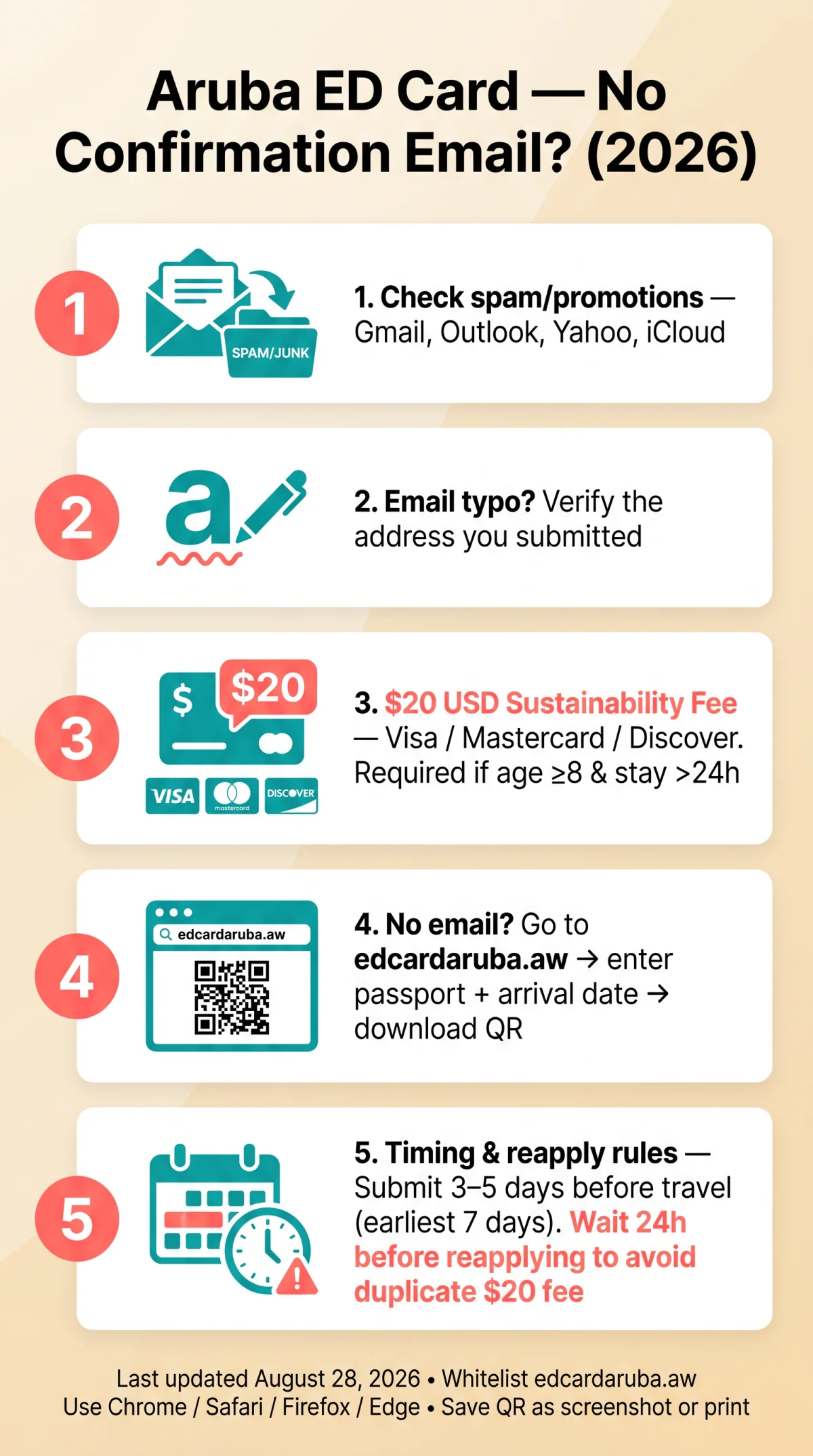
Five specific causes account for nearly all missing Aruba ED Card confirmation emails: spam filtering, email typo, failed payment, third-party site, or processing still underway.
- Spam filtering: the most frequent cause; the message sits in a junk or promotions folder instead of your inbox.
- Typo in the submitted email address: one mistyped character sends the confirmation to a non-existent inbox.
- Failed $20 USD Sustainability Fee payment: mandatory for visitors aged 8 and older staying more than 24 hours; accepted cards are Visa, Mastercard, and Discover. Exemptions: children under 8, transit under 24 hours, on-duty crew, returning within 1 year, and Aruba residents.
- Unauthorized third-party website: only edcardaruba.aw issues valid confirmations; other portals cannot deliver one.
- Application still processing: normal processing takes within minutes to a few hours, so a short delay does not signal failure.
You can verify approval immediately at edcardaruba.aw by entering your passport number and arrival date, no email needed.
How to Find Your Aruba ED Card Email in Spam or Junk Folders
Aruba ED Card confirmation emails are frequently routed to Gmail Promotions, Outlook Quarantine, Yahoo Spam, or iCloud hidden quarantine; each requires a different search. We tested this flow on August 20, 2026: we submitted the Aruba ED Card with a Gmail address, paid the $20 USD Sustainability Fee with a Visa card, and the confirmation email was routed to the Promotions tab, not the primary inbox.

Gmail / Google Mail
- Type from:edcardaruba in the search bar and check the Promotions tab before Spam.
- Select the Aruba ED Card confirmation email, move it to Primary, then add the sender to Contacts.
Outlook / Microsoft 365
- Open the Junk Email folder; business accounts may also quarantine the Aruba ED Card email under the admin portal.
- Release from quarantine and add the edcardaruba.aw domain to Safe Senders.
Yahoo Mail
- Check the Spam folder and the Blocked Senders list.
- Yahoo’s spam filter blocks edcardaruba.aw by default. Go to Settings, Blocked Senders, remove the domain, then add it to Safe Senders.
iCloud Mail
- Check the Junk folder and Mail > Settings > Rules; the Versafire filter may silently divert the Aruba ED Card confirmation email.
Before applying, add edcardaruba.aw to Safe Senders in all email clients.
Check Your Aruba ED Card Application Status Online and Approval Timeline
Travelers can retrieve an approved Aruba ED Card QR code directly at edcardaruba.aw by entering passport number and arrival date, no email access required.
Go to edcardaruba.aw
In Chrome, Safari, Firefox, or Edge.
Select the status check
Or re-download option.
Enter your passport number
And arrival date.
View your approval status
And download the QR code.
Save as screenshot, printed copy, or saved email
For check-in, boarding, or immigration.
The first email (QR code + green checkmark) arrives in minutes to a few hours, sufficient for boarding. The second from DIMAS (Aruban Department of Immigration) follows approximately 8 to 10 hours later and is informational only. The RADEX BCMS system processes all Aruba ED Card submissions; for certainty, verify your status directly on edcardaruba.aw. Submit your Aruba ED Card 3 to 5 days before travel, with a 72-hour buffer recommended. The earliest submission window opens 7 days before arrival. The platform was redesigned on October 30, 2024; estimated form completion time is 10 to 15 minutes.
Reapply, Contact Immigration, and Boarding Without Your Confirmation Email
Wait at least 24 hours and check the edcardaruba.aw portal before reapplying, since duplicate Aruba ED Card submissions may trigger a second $20 fee.
- Waited under 4 hours: check spam + portal. Do not reapply.
- Waited 4 to 24 hours: check portal. If approved, download QR code directly.
- Waited over 24 hours: email [email protected] before resubmitting.
- Suspected scam site or wrong data: submit a new Aruba ED Card application on edcardaruba.aw.
For portal technical support, contact [email protected]. For immigration inquiries, email [email protected] with: full name, passport number, date of birth, nationality, arrival date, flight number, email used for submission, and a brief issue description. Copy-paste template:
Subject: Missing Aruba ED Card Confirmation Email
Full name (as on passport):
Passport number:
Date of birth:
Nationality:
Arrival date:
Flight number:
Email used for submission:
Issue description:
Airlines verify ED Card approval via RADEX using your passport number at check-in, gate, and immigration. Say: “My ED Card was approved, please check my status by passport in RADEX.” Prevention: whitelist edcardaruba.aw, use a supported browser (Chrome, Safari, Firefox, or Edge), apply 3 to 5 days before travel, save the QR code, and note the reference number.
FAQ
Where is my Aruba ED Card confirmation email?
Check spam/junk (Gmail Promotions tab). If not there, verify status at edcardaruba.aw with passport number and arrival date to download your QR code.
How long does it take to get an Aruba ED Card confirmation email?
System confirmation: minutes to a few hours. Secondary DIMAS email: 8 to 10 hours. Only the first is needed for boarding.
Can I check my Aruba ED Card status without the email?
Yes. Go to edcardaruba.aw, select status check, enter passport number and arrival date, download QR code. No email needed.
What if I entered the wrong email address when applying for my Aruba ED Card?
Contact [email protected] with full name, passport number, date of birth, nationality, arrival date, flight number, and email used. They can verify or advise on a new submission.
Should I reapply if I haven’t received my Aruba ED Card confirmation?
Wait 24 hours and check the portal first. Duplicate submissions may trigger a second $20 fee. Contact immigration before reapplying. Reapply only if you suspect a scam site or wrong data.
What does the Aruba ED Card confirmation email look like?
Green checkmark, QR code, full name, passport details, travel dates. Sender domain is edcardaruba.aw. Present as saved email, screenshot, or printed copy.
What is the $20 USD Sustainability Fee and does it affect confirmation?
Mandatory for visitors aged 8+ staying over 24 hours. Accepted: Visa, Mastercard, Discover. Exemptions: children under 8, transit under 24h, crew, returning within 1 year, residents. Failed payment blocks confirmation.
Can I board my flight without the Aruba ED Card confirmation email?
Yes. Airlines verify by passport number via RADEX at check-in, gate, and immigration. Say: “My ED Card was approved, please check my status by passport in RADEX.”
What browsers should I use to submit the Aruba ED Card?
Chrome, Safari, Firefox, or Edge. No dedicated mobile app. Disable VPNs and ad blockers during submission. Ensure JavaScript is enabled.
How do I whitelist the Aruba ED Card sender email?
Add edcardaruba.aw to Safe Senders or Contacts. In Gmail, move from Promotions to Primary and mark as not spam. Whitelist before applying.